Golden images start as a policy decision: production hosts must boot from a known, approved, replaceable baseline. That decision becomes an artifact pipeline at the platform architecture level, then Packer recipes, hardening roles, scan gates, and launch templates that fail closed when someone tries to bypass them.
Manual server builds fail slowly. Each new host is a little different, recovery depends on whoever last knew the setup, and security baselines become tribal knowledge instead of a versioned AMI, Azure image, or GCP image family.
Golden images reverse that. Bake a hardened Linux baseline once, promote the image ID like a release, and constrain production launches to approved versions only.
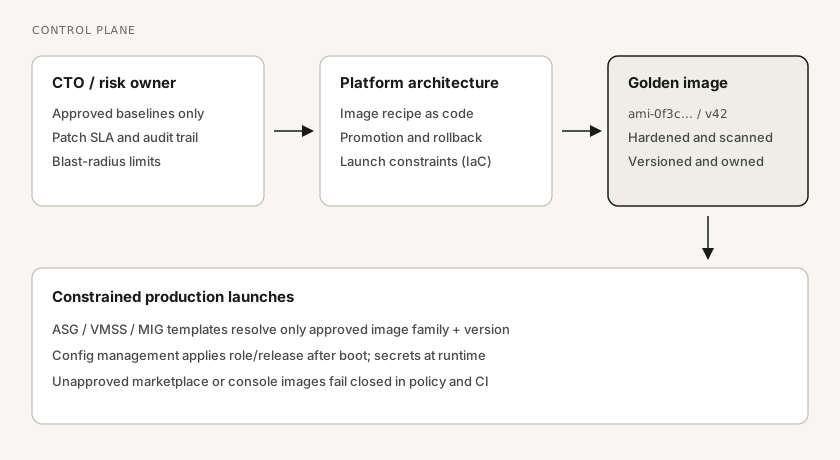
Who needs an image pipeline
Use this model when teams repeatedly provision Linux servers across staging and production, especially where configuration management alone has not eliminated bootstrap variance.
It is the right architecture when:
- new environments appear often enough that manual setup becomes a bottleneck
- security or customer reviews require a known baseline for every host
- incident recovery depends on replacing compromised or failed nodes quickly
- multiple operators provision servers and produce inconsistent results
- AMI, Azure image, or GCP image sprawl has already started without owners
If you provision a handful of long-lived hosts once a year, an image pipeline is overkill.
Seven ways a baseline stops being golden
- Hand-built "golden" images. One engineer builds an AMI from a console session. Nobody can reproduce it, and nobody wants to touch it.
- Secrets baked in for convenience. Certificates, API keys, or database strings land in the image because bootstrap felt hard. Rotation then requires a full rebuild, and every launched instance inherits the secret forever.
- Marketplace images in production. Teams launch from whatever is newest or cheapest. Baseline drift becomes invisible until the first audit or incident.
- Everything baked, nothing configurable. Application releases and environment config get frozen into the image. Promotion slows to a crawl and rollback becomes painful.
- Nothing baked, everything bootstrapped. First-boot scripts reinstall agents, reapply hardening, and re-download packages every launch. Provisioning is slow and fragile under dependency outages.
- No way back. A new image is promoted with nothing that keeps the previous approved version launchable, so a bad baseline cannot be rolled back.
- No retirement policy. Old image versions remain launchable indefinitely. Compromised or unpatched baselines quietly stay available.
Bake versus configure
Golden images and configuration management solve different parts of the same problem.
- Images provide a known starting point.
- Configuration management applies role-specific or release-specific change after boot.
A useful rule: if a change belongs on every host of a given class and changes monthly or less, bake it. If it differs by environment, tenant, or release train, configure it after launch.
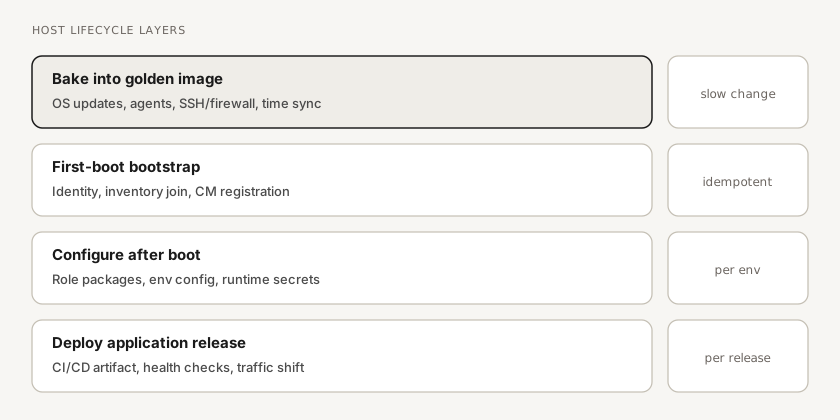
Bake too much and image promotion becomes your bottleneck. Bake too little and every launch reopens drift.
Reference architecture for the image pipeline
Keep the system boring and explicit. A working shape looks like this:
infra/images/
  packer/
    linux-base.pkr.hcl
    variables.pkr.hcl
  ansible/
    site.yml
    roles/baseline/
    roles/hardening/
  scripts/
    assert-baseline.sh
    smoke-boot.sh
  ci/
    build-image.yml
terraform/
  modules/compute/
    launch_template.tf   # pins approved image
  modules/image_policy/
    allowed_amis.tf      # fail-closed source of truth
Ownership boundaries matter as much as folders:
| Concern | Owner | Artifact |
|---|---|---|
| Baseline policy (what must be true) | Security lead / platform lead | Written standard + automated assertions |
| Image recipe and pipeline | Platform engineering | Packer + Ansible + CI |
| Launch constraint | Platform / IaC | Launch template, image family, org policy |
| Role and app config | App / service teams | CM, secrets, deploy pipelines |
Packer recipe shape
Treat the Packer template as the contract for "what every host of class X boots with." Keep builders thin and provisioning explicit.
# packer/linux-base.pkr.hcl (illustrative)
packer {
  required_plugins {
    amazon = {
      source  = "github.com/hashicorp/amazon"
      version = ">= 1.2.0"
    }
  }
}

variable "base_ami" { type = string }
variable "image_version" { type = string }

source "amazon-ebs" "linux_base" {
  ami_name      = "org-linux-base-${var.image_version}"
  instance_type = "t3.large"
  region        = "eu-central-1"
  source_ami    = var.base_ami
  ssh_username  = "ubuntu"

  tags = {
    Name           = "org-linux-base"
    ImageVersion   = var.image_version
    ImageFamily    = "org-linux-base"
    BuiltBy        = "packer-ci"
    SecurityBaseline = "2026.1"
  }
}

build {
  sources = ["source.amazon-ebs.linux_base"]

  provisioner "ansible" {
    playbook_file = "../ansible/site.yml"
    extra_arguments = [
      "--extra-vars", "image_version=${var.image_version}"
    ]
  }

  provisioner "shell" {
    script = "../scripts/assert-baseline.sh"
  }
}
Pin the source AMI by ID or a controlled SSM parameter, not most_recent = true against a broad public filter, unless that filter is itself owned and reviewed. Unpinned "latest Ubuntu" lets a new kernel reach production without review. most_recent is fine later in launch templates when the owner account and approval filters make the candidate set closed.
On Azure and GCP only the builder block changes. The recipe, the Ansible roles, and the assertions stay the same.
Hardening as code, not folklore
Image hardening should encode your real production standard as checks that run on every build.
Ansible keeps the intent reviewable:
# ansible/roles/hardening/tasks/sshd.yml (illustrative)
- name: Configure sshd baseline
  copy:
    dest: /etc/ssh/sshd_config.d/99-org-baseline.conf
    mode: "0644"
    content: |
      PermitRootLogin no
      PasswordAuthentication no
      KbdInteractiveAuthentication no
      X11Forwarding no
      AllowTcpForwarding no
  notify: Restart sshd

- name: Ensure chrony is installed and enabled
  ansible.builtin.package:
    name: chrony
    state: present

- name: Enable chrony
  ansible.builtin.service:
    name: chrony
    enabled: true
    state: started
On Ubuntu and Debian this drop-in path usually works out of the box. On RHEL-family images, verify that Include /etc/ssh/sshd_config.d/*.conf is present and create the directory if needed before relying on 99-org-baseline.conf.
Then assert the result in CI on the built image or a throwaway instance. A green Packer build without assertions is only proof that provisioning did not crash.
# scripts/assert-baseline.sh (illustrative)
set -euo pipefail

sshd -T | grep -qi 'permitrootlogin no'
sshd -T | grep -qi 'passwordauthentication no'
systemctl is-enabled chrony
systemctl is-enabled amazon-cloudwatch-agent || systemctl is-enabled falcon-sensor || true
test ! -f /etc/org/secrets.env   # secrets must never be baked
For internet-facing roles, extend assertions to what must never listen publicly before reverse-proxy or security-group policy is applied.
Build and promotion pipeline
Treat images like release artifacts with owners, versions, and rollback paths.
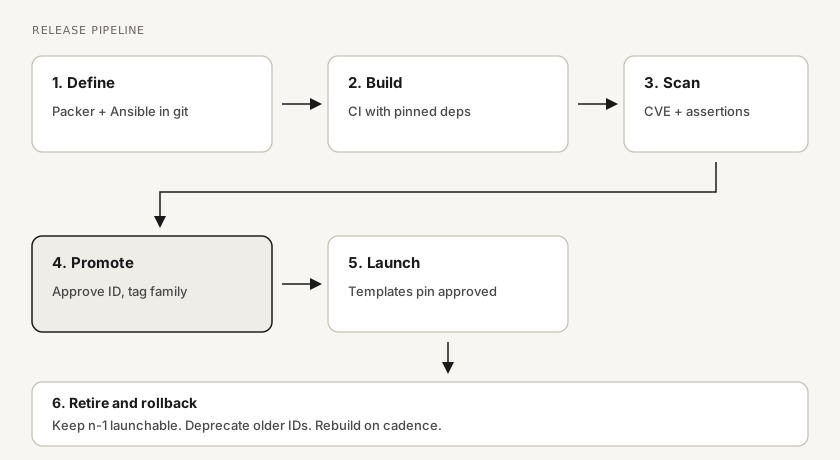
- Define the baseline in git with Packer plus Ansible (or equivalent).
- Build in CI with pinned dependencies and visible logs. Laptop builds do not count.
- Scan for CVEs and baseline assertions before promotion.
- Promote only approved image IDs into the shared image family or parameter store.
- Launch only through templates that resolve approved IDs.
- Retire old versions on a schedule; keep
n-1for rollback.
A minimal CI shape:
{% raw %}
# .github/workflows/build-image.yml (illustrative)
name: build-linux-base-image
on:
  workflow_dispatch:
    inputs:
      image_version:
        required: true
  schedule:
    - cron: "0 4 * * 1" # weekly rebuild cadence

jobs:
  build:
    runs-on: ubuntu-latest
    permissions:
      id-token: write
      contents: read
    steps:
      - uses: actions/checkout@v7
      - uses: aws-actions/configure-aws-credentials@v6
        with:
          role-to-assume: ${{ vars.IMAGE_BUILD_ROLE_ARN }}
          aws-region: eu-central-1
      - name: Build with Packer
        run: |
          packer init packer
          packer build -var "image_version=${{ inputs.image_version || github.run_id }}" packer
      - name: Publish candidate metadata
        run: ./scripts/publish-candidate.sh
      - name: Boot smoke + assert
        run: ./scripts/smoke-boot.sh
{% endraw %}
Promotion should be a separate, reviewable step: candidate to approved. If the job that scans also auto-promotes, a bad image becomes the approved one with nobody looking.
Constrain launches in Terraform
Enforce approved AMIs directly in EC2 launch templates, so an unapproved image cannot launch quietly.
# terraform/modules/compute/launch_template.tf (illustrative)
data "aws_ami" "linux_base" {
  most_recent = true
  owners      = [var.platform_account_id]

  filter {
    name   = "name"
    values = ["org-linux-base-*"]
  }

  filter {
    name   = "tag:ImageFamily"
    values = ["org-linux-base"]
  }

  filter {
    name   = "tag:Approval"
    values = ["approved"]
  }
}

resource "aws_launch_template" "app" {
  name_prefix = "app-"
  image_id    = data.aws_ami.linux_base.id

  # role / userdata for bootstrap only, no long-lived secrets here
  user_data = base64encode(templatefile("${path.module}/bootstrap.sh.tftpl", {
    env = var.environment
  }))
}
Here most_recent = true is intentional: the owner account plus ImageFamily and Approval tags keep the set closed, so "latest approved" is a controlled promotion.
Complement that with org policy or SCP-style guards where available: deny RunInstances unless the AMI has your approval tag or comes from your platform account. IaC filters catch the honest path; policy catches the console bypass.
On Azure, pin a Shared Image Gallery version. On GCP, pin an image family with a controlled latest and retire old images deliberately.
First-boot bootstrap that stays secret-free
Bootstrap should register the host and pull runtime configuration. It should not mint permanent credentials into the disk image.
Patterns that hold up:
- instance identity / IMDSv2 (or cloud equivalent) to prove who the host is
- cloud-init or a small systemd unit that calls your CM / inventory API
- secrets from a manager at runtime, scoped to the instance role
- idempotent scripts that can safely re-run after a failed mid-boot
Patterns that do not:
- baking
.envfiles "just for the first week" - embedding deploy keys with broad repo or cloud access
- copying production TLS keys into
/etcduring Packer
Patch and rebuild cadence
An approved image ages the moment it is published.
Rebuild the base image weekly in CI. Rebuild out of band within three days for a flaw in the highest-risk tier of CISA's BOD 26-04, which weighs internet exposure, known exploitation, whether exploitation can be automated, and whether the flaw gives an attacker full control of the system. Rebuild within 14 days for any other critical or high-risk fix, the deadline in the Cyber Essentials requirements. Force a full rebuild at least monthly, the floor in CIS Control 7.3.
- prefer replace-and-retire over in-place patching of long-lived golden hosts when the estate allows it
- keep the previous approved version launchable until the new one passes production soak
If live hosts still need patching, treat it as emergency response. The steady state is rebuild, promote, relaunch, retire.
Verification
An image is ready for production when a replacement host behaves correctly without manual rescue.
Before approval:
- boot a test instance and confirm required services start cleanly
- validate SSH, DNS, logging, and expected outbound connectivity
- confirm hardening controls behave as designed, including negative checks
- run an application smoke test on top of the image
- verify the instance can be replaced without manual correction
- record the approved image version in change documentation
- confirm the previous version remains available for rollback
A practical smoke harness boots from the candidate AMI, runs assertions over SSH, then tears the instance down and writes the image ID + checksum of assertion output into your change log or image registry metadata.
Related work
Launch constraints assume the account and role boundaries in RBAC in production cloud estates. The Terraform side of launch templates and module pinning is in Terraform module patterns for multi-environment cloud estates.