I have watched more incident calls than I would like get stuck on one question: who has access to touch this account, and why. Who was supposed to have access is rarely what the IAM console says right now. In shared cloud estates with multiple teams, that gap between assumed and actual access is where RBAC either holds or falls apart.
Usually nobody sat down and designed the access model. It grew, one exception at a time, until nobody could explain it in a sentence.
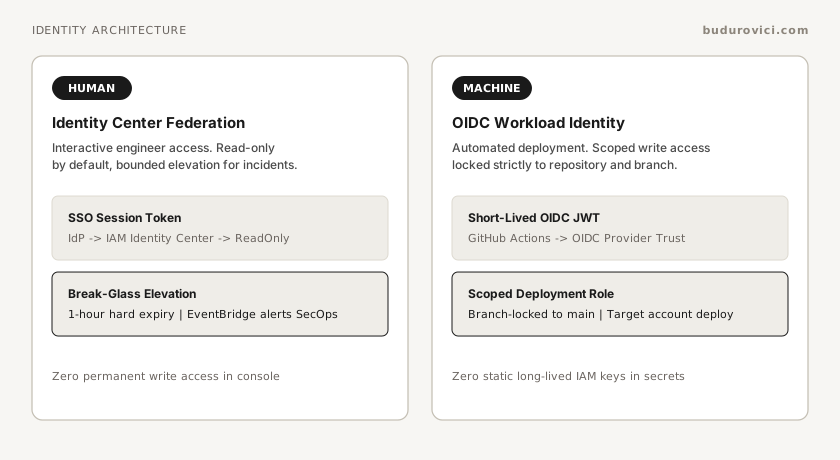
The shape that has held up across organisations gives humans read access by default, machines scoped write access through federation, and anything elevated leaves an audit trail. Exceptions exist, but they are either written down or they become a liability during an audit.
When to structure role-based access
I reach for this model once multiple application teams deploy into shared AWS accounts, Azure subscriptions, or GCP projects under an organisational multi-account strategy, production changes occur frequently enough that informal access has become the norm, and compliance reviews demand attributable changes per engineer or pipeline.
A quieter signal to watch for is emergency access that outlived the emergency that created it. That pattern slips past teams because nobody monitors it directly.
A single account with two engineers probably does not need this yet. Five teams deploying independently with CI pipelines running AdministratorAccess is already overdue.
How production access drifts
- "PowerUser" creep. Someone needs to inspect a DynamoDB table mid-incident, so they get
PowerUserAccess. Half a year later, fifteen engineers are carrying that policy into production permanently, because nobody owns the job of taking it back. - CI/CD pipelines running
AdministratorAccess. A deploy role hits a permission error during setup, so someone widens it to unblock the team, and it never gets narrowed again. A compromised pipeline or a malicious commit now has the blast radius of the entire account. - Static, long-lived access keys. Service accounts authenticating with keys sitting in
.envfiles, CI secrets, or some third-party SaaS tool. They leak eventually, rotation rarely happens on schedule, and there is no real audit trail when it matters. OIDC federation solves this for free. - Break-glass that never breaks back. The role created for one incident stays attached to whoever used it. Eventually it becomes the default path for anyone who finds their normal access too limiting.
- Access that outlives the org chart. Someone changes teams or leaves, and their cloud permissions stick around because access was managed separately from the IdP. An audit six months later turns up a former contractor with production write access, and nobody can say exactly when that should have been revoked.
- Roles sized wrong in both directions. Roles broad enough that people default to them instead of asking for the right permission, and roles so narrow that teams route around the model with local secrets.
- Admin shortcuts. Shared root or admin accounts kept for everyday convenience, and identity admin rights used to dodge pipeline rework.
Human versus machine access
A lot of IAM drift traces back to one mistake: treating human and machine access as the same category of problem.
They are not. Different trust models, different expiry needs, and wildly different consequences when something goes wrong.
A human engineer debugging a customer issue needs to read production logs. That is sufficient. If a write change is needed, the path is: commit the code, let the pipeline deploy it. The moment someone can write directly to production outside that pipeline, you lose the audit trail and the rollback point in the same instant.
A CI/CD pipeline's job is narrower than people often design for. It should touch exactly the resources its own service owns, nothing from another team's IAM policies, network foundations, or secrets store. And the role it assumes should be branch-locked, so a feature branch cannot quietly deploy to production.
If a human is making a write change to production outside an incident, something upstream in the deployment model has already failed.
Reference architecture for multi-account RBAC
A workable structure separates policies by lifecycle: platform foundations update quarterly, application roles deploy alongside services, and break-glass roles exist only in code until an incident triggers them.
iam/
  foundations/            # Platform-owned: OIDC providers, core boundary policies
    github-oidc.tf
    permission-boundaries.tf
  applications/           # App-team scoped: role definitions referencing boundaries
    payment-service.tf
    order-api.tf
  break-glass/            # SecOps-owned: tightly monitored emergency access
    production-break-glass.tf
  scripts/
    audit-stale-roles.sh      # Weekly: flag roles unused for >30 days
The folders matter less than who owns what:
| Concern | Owner | Artifact |
|---|---|---|
| Access policy (who may do what) | Security lead / platform lead | Written standard + automated checks on role definitions |
| Identity federation | Platform engineering | OIDC providers, SSO configuration |
| Pipeline roles | Application teams | Scoped IAM policies within platform-defined boundaries |
| Break-glass review | Security operations | Post-incident CloudTrail review |
CI/CD roles with OIDC
Skip IAM users for pipelines. Configure GitHub Actions as an OpenID Connect identity provider in IAM so the pipeline runtime gets short-lived credentials directly, leaving no static key to store, leak, or rotate.
# terraform/modules/machine_access/ci_roles.tf (illustrative)
resource "aws_iam_role" "app_deployer" {
  name = "ci-deployer-payment-service"

  assume_role_policy = jsonencode({
    Version = "2012-10-17"
    Statement = [
      {
        Effect = "Allow"
        Principal = {
          Federated = aws_iam_openid_connect_provider.github.arn
        }
        Action = "sts:AssumeRoleWithWebIdentity"
        Condition = {
          StringEquals = {
            # Validate the audience so the token cannot be one issued for a different service.
            "token.actions.githubusercontent.com:aud" = "sts.amazonaws.com"
            # Validate the repository and ref so arbitrary repos cannot assume this role.
            "token.actions.githubusercontent.com:sub" = "repo:org/payment-service:ref:refs/heads/main"
          }
        }
      }
    ]
  })
}

# The attached policy should list exactly the actions this pipeline needs,
# not reach for AdministratorAccess to get past a setup error.
resource "aws_iam_role_policy_attachment" "deployer_policy" {
  role       = aws_iam_role.app_deployer.name
  policy_arn = aws_iam_policy.payment_service_deploy_boundary.arn
}
That HCL uses the classic subject format: repo:org/payment-service:ref:refs/heads/main. The sub condition is what locks the role to one branch. A fork, a pull request workflow, a different repo entirely, none of them produce a token that matches, so none of them can assume the role. I would only reach for StringLike if I had a specific reason and understood exactly what it opened up.
Environments change the suffix to repo:org/payment-service:environment:staging in place of the branch ref. Repositories created after 15 July 2026 (not GitHub Enterprise Server) default to an immutable prefix: repo:org@OWNER-ID/name@REPO-ID:…, with the same Environment or ref suffix. A condition written against the classic string will not match that token. A custom sub_claim_prefix template changes the shape again. Before locking the condition, check the actual token via gh api /repos/{org}/{repo}/actions/oidc/customization/sub, or look at a workflow run's OIDC debug output.
Human access via SSO
Engineers authenticate through your IdP (Okta, Microsoft Entra ID, Google Workspace), and their directory groups map directly to cloud permission sets in AWS IAM Identity Center. When someone leaves or changes teams, removing them from the IdP group removes their permission set assignments at the next sync, without touching individual cloud consoles. Sessions already open continue until they expire, so for a departure also revoke the active session.
# terraform/modules/human_access/sso_assignments.tf (illustrative)
resource "aws_ssoadmin_permission_set" "read_only" {
  name             = "ProductionReadOnly"
  instance_arn     = tolist(data.aws_ssoadmin_instances.this.arns)
  session_duration = "PT8H"
}

resource "aws_ssoadmin_managed_policy_attachment" "read_only" {
  instance_arn       = tolist(data.aws_ssoadmin_instances.this.arns)
  permission_set_arn = aws_ssoadmin_permission_set.read_only.arn
  managed_policy_arn = "arn:aws:iam::aws:policy/ReadOnlyAccess"
}

# New engineer joins the team? This assignment is the only change needed.
resource "aws_ssoadmin_account_assignment" "platform_engineers" {
  instance_arn       = tolist(data.aws_ssoadmin_instances.this.arns)
  target_id          = var.production_account_id
  target_type        = "AWS_ACCOUNT"
  principal_type     = "GROUP"
  principal_id       = data.aws_identitystore_group.platform_engineers.group_id
  permission_set_arn = aws_ssoadmin_permission_set.read_only.arn
}
I picked eight hours for session duration deliberately: long enough to cover a real working day, short enough that a session does not sit open through the weekend because someone forgot to close their terminal.
One thing Terraform will not do for you: IAM Identity Center itself has to be switched on manually in the console first. Terraform picks up permission sets and assignments once that instance exists.
Break-glass without permanent privilege creep
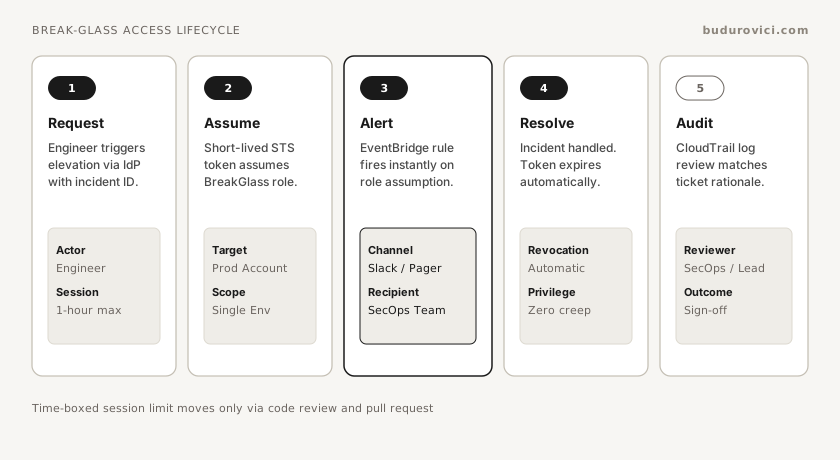
Incidents need fast access. Every use of elevated access must be visible, time-boxed, and reviewed afterward.
What makes this work:
Each environment gets its own break-glass permission set, scoped there and nowhere else. Session duration is capped at one hour, and that cap only moves if someone changes the code and someone else reviews it. An EventBridge rule on the role assumption alerts SecOps. AWS describes delivery of these events as best effort, so the CloudTrail review below is the control of record.
The session name has to carry the incident ticket reference, and I enforce that at the API level:
{
  "Effect": "Allow",
  "Action": "sts:AssumeRole",
  "Resource": "arn:aws:iam::ACCOUNT_ID:role/BreakGlass-Production",
  "Condition": {
    "StringLike": {
      "sts:RoleSessionName": "incident-*"
    }
  }
}
Without the incident- prefix, the assume call fails because the API enforces the condition directly.
Every one of these sessions gets a CloudTrail review within 24 hours of the incident closing.
Measure break-glass usage frequency directly. Invoking emergency access more than once a month without an underlying fix signals a gap in daily permission sets.
Verification
I think of RBAC as working when I can answer yes to these without having to go digging first:
- Can every team deploy their service without standing administrator rights?
- Is every production change attributable to a named person or a named pipeline identity?
- Do access reviews happen on a fixed schedule?
- When an engineer left last month, was their access gone within 24 hours?
- Is break-glass rare enough that each use is genuinely notable?
- Does a new service inherit a default role pattern, or does someone end up inventing permissions from scratch?
Any no in that list is where the gap is, and I fix it there.
Related work
Identity controls operate alongside network boundaries. For VPC and VNet design, peering boundaries, and egress architecture across AWS, Azure, and GCP, see Multi-cloud network topology decisions.